Documentation Index
Fetch the complete documentation index at: https://portkey-docs-log-export-guide-1773064217.mintlify.app/llms.txt
Use this file to discover all available pages before exploring further.
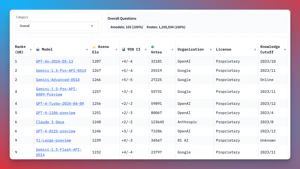
 The LMSYS Chatbot Arena, with over 1,000,000 human comparisons, is the gold standard for evaluating LLM performance.
But, testing multiple LLMs is a pain, requiring you to juggle APIs that all work differently, with different authentication and dependencies.
Enter Portkey: A unified, open source API for accessing over 1,600+ LLMs. Portkey makes it a breeze to call the models on the LMSYS leaderboard - no setup required.
The LMSYS Chatbot Arena, with over 1,000,000 human comparisons, is the gold standard for evaluating LLM performance.
But, testing multiple LLMs is a pain, requiring you to juggle APIs that all work differently, with different authentication and dependencies.
Enter Portkey: A unified, open source API for accessing over 1,600+ LLMs. Portkey makes it a breeze to call the models on the LMSYS leaderboard - no setup required.
In this notebook, you’ll see how Portkey streamlines LLM evaluation for the Top 10 LMSYS Models, giving you valuable insights into cost, performance, and accuracy metrics.
Let’s dive in!
Video Guide
The notebook comes with a video guide that you can follow along
Setting up Portkey
To get started, install the necessary packages:
pip install -qU portkey-ai openai
Defining the Top 10 LMSYS Models
Let’s define the list of Top 10 LMSYS models and their corresponding providers.
top_10_models = [
    ["gpt-4o-2024-05-13", "openai"],
    ["gemini-1.5-pro-latest", "google"],
    ["gpt-4-turbo-2024-04-09", "openai"],
    ["gpt-4-1106-preview", "openai"],
    ["claude-3-opus-20240229", "anthropic"],
    ["gpt-4-0125-preview", "openai"],
    ["gemini-1.5-flash-latest", "google"],
    ["gemini-1.0-pro", "google"],
    ["meta-llama/Llama-3-70b-chat-hf", "together"],
    ["claude-3-sonnet-20240229", "anthropic"],
    ["reka-core-20240501", "reka-ai"],
    ["command-r-plus", "cohere"],
    ["gpt-4-0314", "openai"],
    ["glm-4", "zhipu"],
]
Add Providers to Model Catalog
ALL the providers above are integrated with Portkey - add them to Model Catalog to get provider slugs for streamlined API key management.
# Replace with your provider slugs from Model Catalog
provider_slugs = {
    "openai": "@openai-prod",
    "anthropic": "@anthropic-prod",
    "google": "@google-prod",
    "cohere": "@cohere-prod",
    "together": "@together-prod",
    "reka-ai": "@reka-prod",
    "zhipu": "@zhipu-prod"
}
Running the Models with Portkey
Now, let’s create a function to run the Top 10 LMSYS models using OpenAI SDK with Portkey Gateway:
from openai import OpenAI
from portkey_ai import PORTKEY_GATEWAY_URL, createHeaders

def run_top10_lmsys_models(prompt):
    outputs = {}
    for model, provider in top_10_models:
        client = OpenAI(
            api_key="YOUR_PORTKEY_API_KEY",
            base_url=PORTKEY_GATEWAY_URL,
            default_headers=createHeaders(
                provider=provider_slugs[provider],
                trace_id="COMPARING_LMSYS_MODELS"
            )
        )
        response = client.chat.completions.create(
            messages=[{"role": "user", "content": prompt}],
            model=model,
            max_tokens=256
        )
        outputs[model] = response.choices[0].message.content
    return outputs
Comparing Model Outputs
To display the model outputs in a tabular format for easy comparison, we define the print_model_outputs function:
from tabulate import tabulate

def print_model_outputs(prompt):
    outputs = run_top10_lmsys_models(prompt)
    table_data = []
    for model, output in outputs.items():
        table_data.append([model, output.strip()])
    headers = ["Model", "Output"]
    table = tabulate(table_data, headers, tablefmt="grid")
    print(table)
Example: Evaluating LLMs for a Specific Task
Let’s run the notebook with a specific prompt to showcase the differences in responses from various LLMs:

On Portkey, you will be able to see the logs for all models:
prompt = "If 20 shirts take 5 hours to dry, how much time will 100 shirts take to dry?"
print_model_outputs(prompt)
Conclusion
With minimal setup and code modifications, Portkey enables you to streamline your LLM evaluation process and easily call 1600+ LLMs to find the best model for your specific use case.
Explore Portkey further and integrate it into your own projects. Visit the Portkey documentation at https://docs.portkey.ai/ for more information on how to leverage Portkey’s capabilities in your workflow.