Portkey’s virtual key system allows you to securely store your LLM API keys in our vault, utilizing a unique virtual identifier to streamline API key management.
MIGRATION NOTICE We are upgrading the Virtual Key experience with the Model Catalog feature.With Model Catalog, you can now:
Set model level budget & rate limits
Inherit budget & rate limits from parent AI provider integrations
Set granular, workspace-level access controls
Pass the provider slug (previosuly known as virtual key) with the model param in your LLM requests
Upgrade to Model Catalog
Learn how to replace your virtual keys with Model Catalog
This feature also provides the following benefits:
Easier key rotation
The ability to generate multiple virtual keys for a single API key
Imposition of restrictions based on cost, request volume, and user access
These can be managed within your account under the “Virtual Keys” tab.
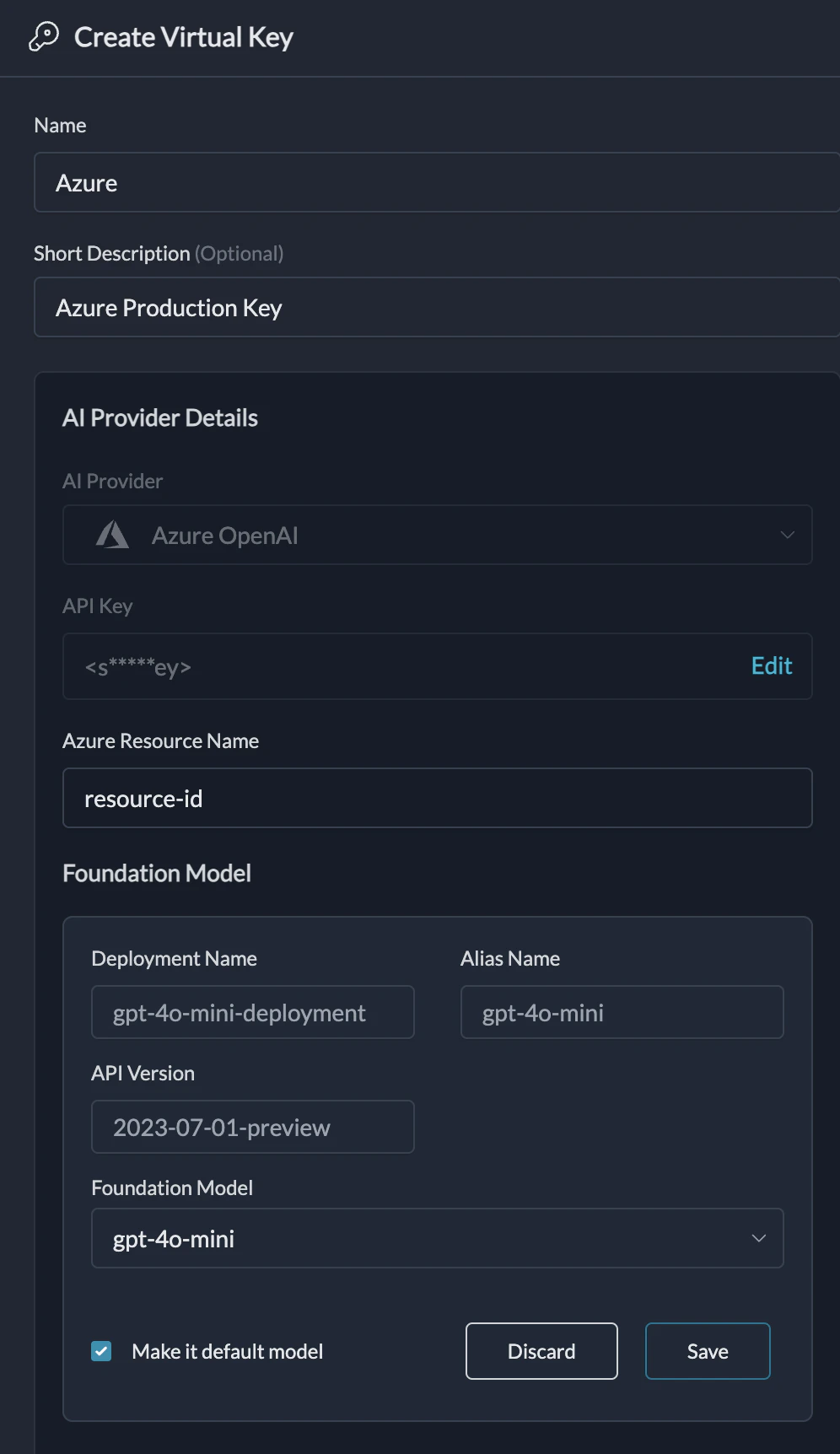
Azure Virtual Keys allow you to manage multiple Azure deployments under a single virtual key. This feature simplifies API key management and enables flexible usage of different Azure OpenAI models.
You can create multiple deployments under the same resource group and manage them using a single virtual key.
To use the required deployment, simply pass the alias of the deployment as the model in LLM request body. In case the models is left empty or the specified alias does not exist, the default deployment is used.
Your API keys are encrypted and stored in secure vaults, accessible only at the moment of a request. Decryption is performed exclusively in isolated workers and only when necessary, ensuring the highest level of data security.
How are the provider keys linked to the virtual key?
We randomly generate virtual keys and link them separately to the securely stored keys. This means, your raw API keys can not be reverse engineered from the virtual keys.
Add the virtual key directly to the initialization configuration for Portkey.
NodeJS
Python
Copy
Ask AI
import Portkey from 'portkey-ai'const portkey = new Portkey({ apiKey: "PORTKEY_API_KEY", // defaults to process.env["PORTKEY_API_KEY"] virtualKey: "VIRTUAL_KEY" // Portkey supports a vault for your LLM Keys})
Copy
Ask AI
# Construct a client with a virtual keyportkey = Portkey( api_key="PORTKEY_API_KEY", virtual_key="VIRTUAL_KEY")
Alternatively, you can override the virtual key during the completions call as follows:
NodeJS SDK
Python SDK
Copy
Ask AI
const chatCompletion = await portkey.chat.completions.create({ messages: [{ role: 'user', content: 'Say this is a test' }], model: 'gpt-3.5-turbo',}, {virtualKey: "OVERRIDING_VIRTUAL_KEY"});
Copy
Ask AI
completion = portkey.with_options(virtual_key="...").chat.completions.create( messages = [{ "role": 'user', "content": 'Say this is a test' }], model = 'gpt-3.5-turbo')
Add the virtual key directly to the initialization configuration for the OpenAI client.
NodeJS
Python
Copy
Ask AI
import OpenAI from "openai";import { PORTKEY_GATEWAY_URL, createHeaders } from 'portkey-ai'const openai = new OpenAI({ apiKey: '', // can be left blank baseURL: PORTKEY_GATEWAY_URL, defaultHeaders: createHeaders({ apiKey: "PORTKEY_API_KEY", // defaults to process.env["PORTKEY_API_KEY"] virtualKey: "VIRTUAL_KEY" // Portkey supports a vault for your LLM Keys })});
Copy
Ask AI
# Construct a client with a virtual keyfrom openai import OpenAIfrom portkey_ai import PORTKEY_GATEWAY_URL, createHeadersclient = OpenAI( api_key="", # can be left blank base_url=PORTKEY_GATEWAY_URL, default_headers=createHeaders( api_key="PORTKEY_API_KEY" # defaults to os.environ.get("PORTKEY_API_KEY") virtual_key="VIRTUAL_KEY" # Portkey supports a vault for your LLM Keys ))
Alternatively, you can override the virtual key during the completions call as follows:
NodeJS SDK
Python SDK
Copy
Ask AI
const chatCompletion = await portkey.chat.completions.create({ messages: [{ role: 'user', content: 'Say this is a test' }], model: 'gpt-3.5-turbo',}, {virtualKey: "OVERRIDING_VIRTUAL_KEY"});
Copy
Ask AI
completion = portkey.with_options(virtual_key="...").chat.completions.create( messages = [{ "role": 'user', "content": 'Say this is a test' }], model = 'gpt-3.5-turbo')
const chatCompletion = await portkey.chat.completions.create({ messages: [{ role: 'user', content: 'Say this is a test' }], model: 'gpt-4o', // This will be the alias of the deployment}, {virtualKey: "VIRTUAL_KEY"});
Portkey provides a simple way to set budget limits for any of your virtual keys and helps you manage your spending on AI providers (and LLMs) - giving you confidence and control over your application’s costs.Budget Limits